
HR Document Notarization: A Practical 2026 Guide
HR Document Notarization: A Practical 2026 Guide
Notarization confirms a signer’s identity and that the signature was made voluntarily. It does not validate the truth of the document’s contents. That single distinction drives every compliance decision HR teams face when handling notarized paperwork. The National Notary Association sets the process standards; USCIS governs critical exceptions like Form I-9; and services like Notarypage give HR teams an operational path to get it done reliably.
Two things HR should know immediately:
- Notarization raises a document’s evidentiary weight in court and shifts the burden of proof, but it does not make false statements true or illegal contracts enforceable.
- Most routine payroll forms, standard benefits enrollment, and Form I-9 do not require notarization. Requiring it unnecessarily adds friction without adding compliance value.
Table of Contents
- How HR document notarization works: the three core steps
- Which HR documents actually need notarization?
- What HR needs to know about remote online notarization
- Common misconceptions HR must stop making
- A practical HR workflow for notarized documents
- What notarization typically costs and how long it takes
- How to spot red flags and verify notary credentials
- Key Takeaways
- Why centralized notary services change HR operations
- Notarypage makes HR notarizations faster and more defensible
- Useful sources for HR teams
How HR document notarization works: the three core steps
Notarization is a three-part act: identity verification, witnessing the signature or administering an oath, and completing the notarial certificate with a seal. Each step has a specific purpose HR staff should understand.
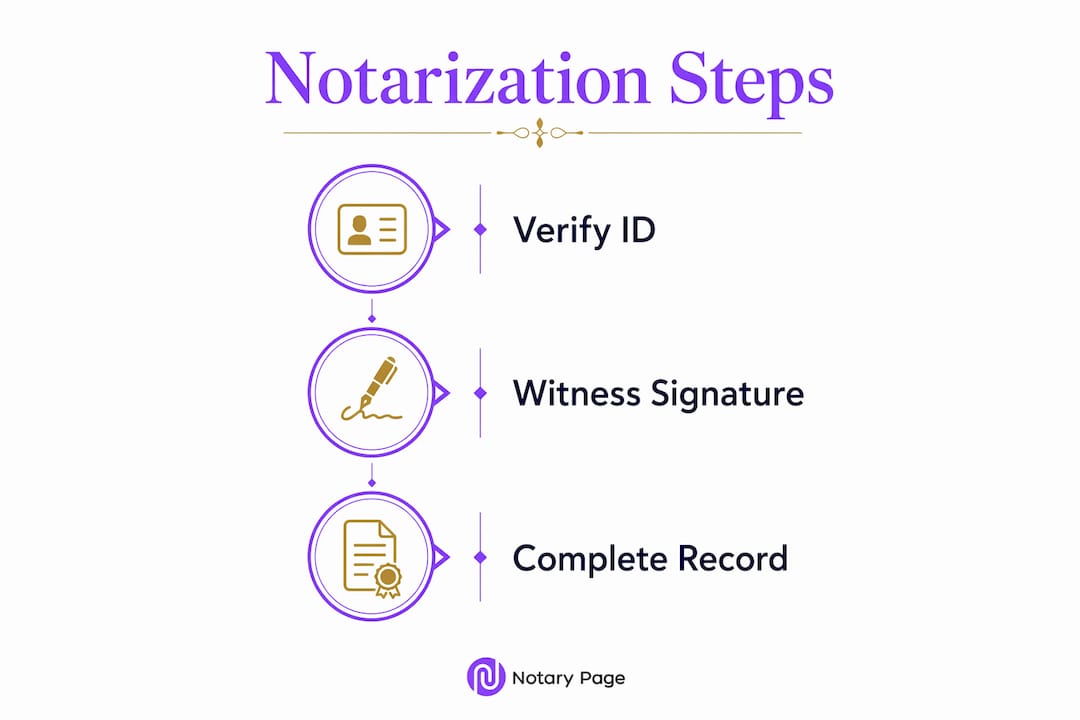
Identity verification. The notary checks a current, unexpired government-issued photo ID — a driver’s license, state ID, or passport. For remote online notarization (RON), the platform adds credential analysis and knowledge-based authentication questions drawn from public records.
Witnessing vs. jurat. These are two different notarial acts. An acknowledgment asks the signer to confirm the signature is theirs and was made voluntarily — standard for powers of attorney and real estate deeds. A jurat requires the signer to take an oath or affirmation that the document’s contents are truthful, which is required for affidavits. A typical acknowledgment certificate reads: “…personally appeared before me and acknowledged that they executed the foregoing instrument for the purposes therein stated.” A jurat reads: “Subscribed and sworn to before me this ___ day of ___, by ___.”
Notarial certificate and seal. After the signing, the notary completes the certificate, adds their signature, official seal, commission expiration date, and records the transaction in a journal (date, signer name, ID type used). For RON, the platform also retains an audiovisual recording and a session ID.
“Notarization imbues a written document with undeniable and unspoken intention and commitment, providing a singular and secure solution that gives trust a material form.” — National Notary Association
Pro Tip: Always ask the notary for a copy of their journal entry or, for RON, the session ID. That record is your audit evidence if a filing office ever questions the notarization.
Which HR documents actually need notarization?
Require notarization only when a receiving party, statute, or filing office expressly asks for it, or when a document transfers significant rights. Applying it broadly wastes time and creates unnecessary friction.
Documents that commonly require notarization:
- Powers of attorney (financial or medical, for employees or dependents)
- Affidavits submitted in employment disputes or background-check processes
- Certain custodial or guardianship documents tied to benefits
- Employment letters intended for use abroad (often paired with an apostille)
- Some state-specific separation agreements
Documents that typically do not:
- Standard payroll forms and direct-deposit authorizations
- Routine benefits enrollment forms
- Form I-9 (see the misconceptions section below)
- Standard offer letters and at-will acknowledgments
Decision checklist for HR:
- Who receives the document — a court, a foreign government, a financial institution?
- Does the jurisdiction’s filing rules require a specific notarial act?
- Is this an affidavit (jurat required) or a signature confirmation (acknowledgment)?
- Will the document be used internationally? If so, an apostille may be needed. For documents headed to non-Hague Convention countries, a full legalization chain applies — notarization, then state authentication, then federal and consular certification. Understanding the difference between notarization, attestation, and translation for international use can prevent costly rejections.
What HR needs to know about remote online notarization
RON performs the same core notarial acts as in-person notarization but uses digital identity verification and an audiovisual record. Acceptance depends on the state where the notary is commissioned and the rules of the receiving party.
RON identity checks go further than in-person: ID scan, credential analysis, and knowledge-based authentication. The audit trail includes a video recording, an electronic journal, and a tamper-evident certificate. RON carries equal legal validity to in-person notarization in states that have enacted permanent RON laws.

| Method | Identity Verification | Audit Trail | HR Best Use Case |
|---|---|---|---|
| Traditional in-person | Government ID, visual check | Paper journal entry | Local hires, recorded documents |
| IPEN/RIN | Government ID, electronic signature | Electronic journal | Hybrid offices, same-day closings |
| RON | ID scan + KBA + credential analysis | Video recording + session ID | Remote hires, high-volume onboarding |
State law governs RON acceptance. Some states have permanent RON statutes; others restrict or do not authorize it. HR must confirm both the notary’s commissioning state and the destination agency’s acceptance policy before routing documents through RON.
Pro Tip: Before requiring RON for a remote hire’s documents, call the receiving agency and confirm they accept electronically notarized certificates. A rejected filing costs more time than an in-person appointment.
Common misconceptions HR must stop making
Notarization verifies identity and willingness only. It does not attest to the truth or legality of the document’s contents. A notarized affidavit full of false statements is still a notarized document, and courts can still reject notarized documents for procedural errors or substantive problems.
The biggest HR-specific mistake involves Form I-9. USCIS is explicit: Form I-9 does not require notarization. A notary who helps complete Section 2 does so as an authorized representative of the employer, not as a notary public. Affixing a notary seal to an I-9 is procedurally improper and can render the form defective. The National Notary Association has warned about this error repeatedly because it keeps happening.
Other common errors HR should prevent:
- Substituting an acknowledgment for a jurat (or vice versa) because the wrong act was requested
- Using correction fluid on a notarial certificate — this can invalidate the notarization entirely
- Accepting a document notarized by someone whose commission has expired
When a notarial certificate contains an error, the correct fix is a single line through the mistake with the notary’s initials, or reissuing the certificate from scratch. Never use white-out.
Key compliance point: Notarization shifts the evidentiary burden in court but does not immunize a document from rejection if the wrong notarial act was used or the certificate contains uncorrected errors.
A practical HR workflow for notarized documents
A reliable HR workflow minimizes errors by standardizing request language, specifying the notarial act required, and confirming acceptance rules with the receiving party before scheduling.
- Identify the document type and confirm whether notarization or an authorized representative is needed.
- Specify the notarial act in your request (acknowledgment or jurat) — never leave this to the signer to guess.
- Instruct the signer in writing: bring a current government-issued photo ID, do not sign the document before appearing before the notary (unless it is an acknowledgment and pre-signing is acceptable).
- Schedule the appointment — in-person or RON — and confirm the notary’s commission is current.
- Collect the completed document and verify: seal present, certificate complete, commission expiration date visible.
- Store and index the notarized document with the journal entry or session ID attached.
Recordkeeping best practices:
- Retain notarized HR documents for the period required by the applicable federal or state rule (e.g., I-9s have their own retention timeline; employment-related affidavits may follow state civil procedure rules).
- Request a copy of the notary’s journal entry or RON session ID for every transaction.
- Redact unnecessary PII from scanned copies before storing in shared HR systems.
- Embed a one-page notarization checklist into your onboarding packet so new hires arrive prepared.
Pro Tip: Build a simple intake form that captures the notary’s printed name, commission state, commission expiration date, and session ID (for RON). That form takes 30 seconds to fill out and saves hours if a document is ever challenged.
What notarization typically costs and how long it takes
Costs and timelines vary by state and method. In-person notarizations carry a small per-signature fee set by state law; RON and outsourced authorized-representative services tend to cost more per transaction.
| Method | Typical Fee Range | Typical Turnaround |
|---|---|---|
| In-person (state-regulated) | $2 per signature | Same day |
| IPEN/RIN | — | Same day |
| RON (platform-based) | — | Minutes to same day |
For urgent hiring situations or high-volume onboarding, on-demand RON services eliminate the scheduling delays that slow traditional notarization. Apostille processing adds time on top of notarization — standard mail-in processing for a Florida apostille, for example, can run 25–35 business days, with expedited options available.
Retention reminders:
- Confirm the receiving agency’s retention requirement, not just your internal policy.
- Store the notarial certificate and journal copy together with the underlying document.
- Flag documents with expiring relevance (e.g., powers of attorney) for periodic review.
How to spot red flags and verify notary credentials
Treat any missing journal entry, expired commission, absent audiovisual record for RON, or unexpected redaction as a red flag that requires verification before relying on the document.
Verification checklist for HR:
- Confirm the notary’s commission via your state’s official commission lookup (typically through the Secretary of State’s office).
- For RON, request the session ID and confirm it matches the platform’s records.
- Check the seal: it should include the notary’s name, commission number, state, and expiration date.
- Confirm the correct notarial act was used — an acknowledgment certificate on an affidavit is a procedural mismatch.
- Verify the ID used at signing was unexpired on the date of notarization.
Pro Tip: Add a verification field to your document intake form: notary’s printed name, commission state, commission expiration, and session ID for RON. A document-audit workflow, like the one offered by Divvi’s document audit tool, can help HR teams systematically flag incomplete or inconsistent records before they reach a filing office.
When fraud or error is suspected, pause reliance on the document immediately, request re-notarization with a new certificate, and document every remediation step in writing.
Key Takeaways
Notarization confirms identity and voluntary signing only — it never validates the truth of a document’s contents, and using the wrong notarial act or affixing a seal to a Form I-9 can invalidate the document entirely.
| Point | Details |
|---|---|
| What notarization certifies | Identity and voluntary signature only — not the truth or legality of the document’s contents. |
| I-9 exception | Form I-9 does not require notarization; a notary acting as authorized representative must not affix a seal. |
| RON acceptance check | Confirm both the notary’s commissioning state and the receiving agency’s policy before using RON. |
| Verify notary credentials | Check commission status via state lookup; request journal entry or session ID for every transaction. |
| Notarypage for HR teams | Notarypage offers nationwide in-person and RON options with audit trails and E&O coverage through Hiscox. |
Why centralized notary services change HR operations
HR teams that manage notarizations ad hoc spend more time chasing signers, correcting procedural errors, and resubmitting rejected documents than teams that use a centralized service. The scheduling friction alone, coordinating a signer, a notary, and a filing deadline across time zones, adds up fast in high-volume hiring seasons.
Centralized notary services solve this by combining scheduling, state compliance checks, and audit trails in one place. Fewer documents come back rejected because the notarial act was wrong or the commission had lapsed. Onboarding moves faster because remote employees can complete RON sessions the same day they receive their offer. And when a filing office questions a document six months later, the session ID and journal copy are already on file.
The operational case for centralization is straightforward: standardize the process once, and the compliance risk drops with every subsequent hire.
Notarypage makes HR notarizations faster and more defensible
HR teams dealing with multi-state hiring, remote employees, and tight onboarding timelines need more than a local notary directory. Notarypage covers the full range: nationwide in-person appointments and RON sessions, with scheduling, identity verification, and audit trails built into the workflow.
What HR teams get with Notarypage:
- Nationwide coverage for both in-person and remote signings
- RON sessions with session IDs and audiovisual records for every transaction
- $1,000,000 errors and omissions coverage through Hiscox
- Real-time status updates so HR knows when a document is complete
- A consistent process that reduces the procedural errors that cause filing rejections
To see how Notarypage fits your onboarding workflow, schedule a notarization or review service options at notarypage.com.
Useful sources for HR teams
- USCIS I-9 guidance and FAQs — authoritative source on Form I-9 rules and the authorized representative standard
- National Notary Association — what is notarization — process standards, certificate wording, and notarial act definitions
- National Notary Association — I-9 forms and notaries — specific guidance on the seal-on-I-9 error
- DocuSign — how to notarize a document — RON overview, identity verification methods, and audit trail features
- LegalClarity — does a notarized document hold up in court — evidentiary weight and limits of notarization
This article is general information, not legal advice. Confirm current rules with your state’s notary commission, the receiving agency, and a qualified attorney for your specific situation.