
How Notarization Status Updates Work: A Developer Guide
How Notarization Status Updates Work: A Developer Guide
Notarization status updates are event-driven or polled lifecycle signals, each tied to a submission UUID, that your system must map to deterministic actions. Apple’s Notary API, DigiCert’s Software Trust Manager (smctl/Notary Server), and document-signing platforms like Notarypage all expose these signals differently, but the underlying state machine is the same: a submission moves through discrete phases, and your code needs to react to each one without ambiguity.
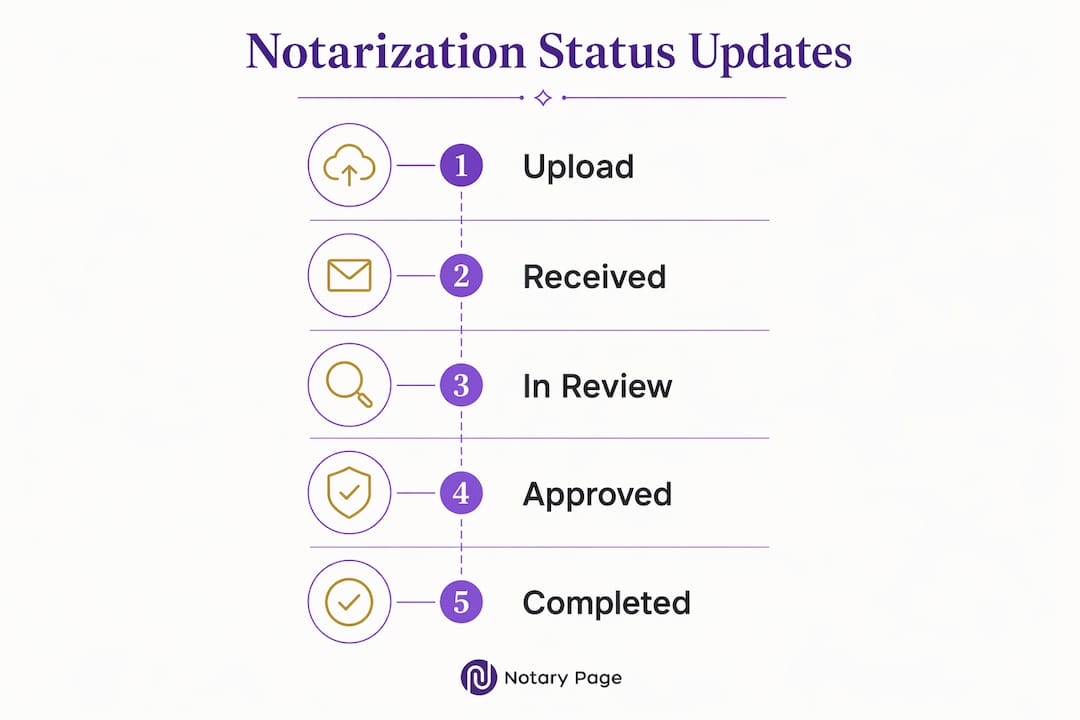
The canonical states you’ll encounter across providers:
- Received — submission acknowledged; enqueue a tracking record
- In Progress — processing underway; start a polling timer or await webhook
- Viewed — signer opened the document; log the timestamp, prepare re-engagement
- Attempted — signer started but did not finish; trigger re-engagement immediately
- Accepted / Completed — notarization passed; generate certificate, release payment hold
- Rejected / Failed — hard stop; surface error details, notify team, do not auto-retry without inspection
- Expired — SLA breached; escalate and archive logs
Map every inbound status string to one of these canonical states before any business logic runs. That single normalization step is what keeps multi-provider integrations from turning into a tangle of provider-specific conditionals.
Table of Contents
- How Apple’s notarization workflow exposes status to your code
- DigiCert Software Trust Manager: smctl commands and status fields
- A canonical state machine your whole pipeline can share
- Polling vs. webhooks: which pattern fits your notarization workflow
- Troubleshooting common notarization failures
- Security, audit trails, and U.S. compliance for status callbacks
- Copy-paste-ready CLI commands, webhook payload, and handler pseudo-code
- How Notarypage models status updates as business rules
- Key Takeaways
- Notarypage reduces the engineering overhead of notarization tracking
How Apple’s notarization workflow exposes status to your code
Apple identifies every submission with a UUID returned at upload time. That UUID is your primary key for every subsequent status check. With notarytool (the current tool, replacing the deprecated altool), you retrieve status like this:
xcrun notarytool info <submission-uuid> \
  --apple-id "[email protected]" \
  --password "@keychain:AC_PASSWORD" \
  --team-id "TEAMID123"
The response includes a status field that maps to one of Apple’s values: Accepted, In Progress, Invalid, or Rejected. Apple’s Get Submission Status endpoint lets you retrieve the same data programmatically, and you can pull up to the 100 most recent submissions in a single list call.
| Apple status | Canonical state | Recommended action |
|---|---|---|
| In Progress | In Progress | Poll every 30–60 seconds; set SLA timer |
| Accepted | Completed | Staple ticket, archive logs, release build |
| Invalid | Rejected | Parse log URL, surface entitlement errors |
| Rejected | Rejected | Inspect issues array, do not auto-retry |
Typical processing runs quickly for most binaries, though large or complex submissions can take longer. After a status of Accepted, always staple the notarization ticket to the binary with xcrun stapler staple <app-path> before distribution.
On log retrieval: Apple returns a log URL in the status response even for accepted submissions. Always fetch and store it. Rejected submissions include an
issuesarray with specific entitlement violations, missing hardened runtime flags, or embedded content problems. Parsing that array is faster than reading the raw log.
Pro Tip: In Progress is sometimes transient. Apple’s notary service occasionally cycles a submission through In Progress → Rejected → Accepted as it learns to recognize a new app binary. If you see a Rejected status within the first few minutes, wait and re-check before treating it as a hard failure. Developer forum reports confirm this behavior, including statusCode 7000 (“Team is not yet configured for notarization”) appearing on the first submission from a new team.
DigiCert Software Trust Manager: smctl commands and status fields
DigiCert’s Software Trust Manager exposes notarization status through the smctl CLI. The notarization status command takes a Notary Server submission ID and a tool flag:
smctl-mac-x64 notarization status \
  --tool notarytool \
  <NotaryServer-submission-id>
Use --tool altool if your pipeline still runs the legacy tool. The --help flag prints all supported flags for the current binary version.
Key behaviors to know:
- Notarization typically completes in under an hour per DigiCert’s documentation; build your polling interval around that baseline.
- When notarization finishes, the certificate object populates
txid,merkle_proof,merkle_root,contract, andsenderfields. Emptytxidandmerkle_prooffields mean the certificate is still generating — do not treat an emptytxidas an error. - The
certificate_web_urlfield appears in the completed response and links to the human-readable certificate page.
On blockchain fields: An empty
txidis not a failure signal. It means the asynchronous certificate generation is still running. Poll after roughly one hour before concluding that something went wrong. Checking too early produces false negatives and wastes API quota.
Recommended polling sequence for DigiCert/Notary Server:
- Submit the file and record the submission ID.
- Wait at least 15 minutes before the first status check.
- If
txidis empty, wait another 30–45 minutes and re-check. - After one hour with no
txid, log a warning and trigger an alert. - If the certificate URL is populated but
txidremains empty after two hours, escalate to DigiCert support with the submission ID and upload timestamp.
A canonical state machine your whole pipeline can share
Vendor-specific status strings are an integration liability. The fix is a thin normalization layer that maps every inbound string to a canonical state before any business logic touches it.

| Canonical state | Typical trigger | System action | Timeout threshold |
|---|---|---|---|
| Received | Submission acknowledged | Persist UUID, start SLA clock | 5 min to In Progress |
| Sent | Document dispatched to signer | Log delivery timestamp | — |
| Viewed | Signer opened document | Log; prepare re-engagement message | — |
| Attempted | Signer started, did not finish | Send re-engagement notification | — |
| In Progress | Provider processing | Poll or await webhook | Provider SLA |
| Partially Complete | Some signers done | Notify remaining signers | Per workflow SLA |
| Completed | All parties done | Release payment hold, generate certificate | N/A |
| Completed with Rejections | Partial failure | Flag for review, hold payment | Manual review |
| Rejected | Hard provider rejection | Surface errors, notify team | N/A |
| Failed | System or network error | Retry with backoff, then escalate | 3 retries |
| Expired | SLA breached | Archive, alert, reassign if applicable | N/A |
Offline notarization workflows add a Pending Approval state between upload and Completed. When a document is uploaded after offline notarization, it moves to Pending Approval, and a reviewer must approve or reject it before the workflow advances. Attach payment holds to this state, not to Completed, so funds are never released before human review.
Pro Tip: Treat In Progress as an expandable set of sub-states. Some platforms expose sub-events like “identity verification,” “meeting requested,” and “meeting started.” Inspect the history log or sub-event stream to distinguish user activity from system processing. That distinction matters when you’re deciding whether to re-engage a signer or simply wait.
Polling vs. webhooks: which pattern fits your notarization workflow
Both patterns work. The choice depends on your latency requirements and operational tolerance.
Polling is simpler to implement and easier to reason about under load. You control the request rate, and there’s no inbound surface to secure. The downside is latency: a 60-second poll interval means up to a minute of lag on every state change.
Webhooks deliver state changes in near real-time and reduce API load, but they require an inbound HTTPS endpoint, payload signature verification, and replay protection. For high-volume pipelines, webhooks are the right call.
Concrete guidance:
- Always store the submission UUID as your idempotency key. If a webhook fires twice for the same state transition, your handler should detect the duplicate and skip reprocessing.
- Use exponential backoff for polling: start at 30 seconds, double each interval, cap at 10 minutes. Reset the timer on any non-terminal state change.
- For webhook handlers, verify the
X-Signatureheader (or provider equivalent) before processing. Reject any payload that fails signature validation with a400. - Maintain a dedup store (Redis or a database unique constraint on
submission_uuid + status) to guard against out-of-order delivery.
Pro Tip: Don’t poll blockchain txid fields immediately after submission. Wait at least one hour before your first check. Checking earlier generates false negatives and burns API quota on a result that will always be empty.
Numbered retry sequence for a failed webhook delivery:
- Attempt 1: immediate
- Attempt 2: 30 seconds
- Attempt 3: 2 minutes
- Attempt 4: 10 minutes
- Attempt 5: 1 hour — if still failing, alert on-call and open a support ticket
Troubleshooting common notarization failures
Most failures fall into three buckets: configuration errors, transient provider issues, and entitlement/certificate problems. Work through them in that order.
Initial triage checklist:
- Confirm the submission UUID is recorded and matches what the provider returned at upload.
- Run the provider CLI status command and capture the full output, including any
issuesarray or log URL. - Fetch and store the log file before it expires (Apple log URLs expire after a short window).
- Validate that your Developer ID certificate is not expired and that hardened runtime is enabled.
- Check that your team has accepted the current Xcode and notarization agreements in App Store Connect.
- Verify you haven’t hit rate limits (Apple enforces per-team submission rate limits).
On “Team is not yet configured for notarization”: This error (Apple
statusCode 7000) appears when a team hasn’t accepted the required agreements in App Store Connect, or on the very first submission from a new team. It can also appear transiently and resolve on re-submission. Check agreements first. If agreements are current, wait 10 minutes and re-submit before escalating.
When to re-submit vs. escalate:
- Re-submit if the failure is a configuration error you’ve now fixed (missing entitlement, expired cert, unsigned binary).
- Re-submit with backoff if the failure looks transient (Apple
In Progresscycling, network timeout). - Escalate to provider support if the same submission ID has been
In Progressbeyond the provider’s stated SLA with no log output. - When escalating, include: submission UUID, upload timestamp, SHA-256 of the submitted file, full CLI output, and any log file content.
Security, audit trails, and U.S. compliance for status callbacks
Status callbacks are an attack surface. Treat them accordingly.
- Verify every inbound webhook payload against the provider’s signature header before processing. Use constant-time comparison to prevent timing attacks.
- Enforce HTTPS on all callback endpoints. Reject HTTP connections at the load balancer, not in application code.
- Implement timestamp validation: reject any payload with a timestamp older than five minutes to block replay attacks.
- Rotate signing secrets on a schedule (quarterly at minimum) and immediately after any suspected exposure.
- IP allow-list provider callback ranges where the provider publishes them.
For U.S. legal and compliance contexts, retain notarization certificates, txid values, merkle proofs, and system audit logs for the duration required by your applicable regulations. For real estate and loan-closing workflows, mortgage document notarization carries specific retention requirements under state law; consult qualified legal counsel for your jurisdiction.
Pro Tip: Strip PII from status logs before writing to shared log aggregators. Submission UUIDs, timestamps, and status strings are safe to log. Signer names, addresses, and document content are not. Redact at the application layer before the log line is written, not after.
Copy-paste-ready CLI commands, webhook payload, and handler pseudo-code
Apple notarytool — submit and check:
# Submit
xcrun notarytool submit MyApp.zip \
  --apple-id "[email protected]" \
  --password "@keychain:AC_PASSWORD" \
  --team-id "TEAMID123" \
  --wait

# Check status by UUID
xcrun notarytool info <submission-uuid> \
  --apple-id "[email protected]" \
  --password "@keychain:AC_PASSWORD" \
  --team-id "TEAMID123"
DigiCert smctl — check status:
smctl-mac-x64 notarization status \
  --tool notarytool \
  <NotaryServer-submission-id>
Sample webhook payload (canonical fields):
{
  "submission_uuid": "a1b2c3d4-...",
  "phase": "Completed",
  "state": "Accepted",
  "timestamp": "2025-11-14T14:32:00Z",
  "certificate_id": "cert-9876",
  "txid": "0xabc123...",
  "merkle_proof": "0xdef456..."
}
Verification header:
X-Notary-Signature: <HMAC-SHA256 of body>
Idempotent handler pseudo-code:
- Extract
submission_uuidandstatefrom payload. - Verify
X-Notary-Signatureagainst shared secret; return400on mismatch. - Check dedup store: if
(submission_uuid, state)already processed, return200immediately. - Validate state transition: reject illegal transitions (e.g.,
Completed → In Progress). - Write audit record:
{uuid, from_state, to_state, timestamp, raw_payload}. - Execute business logic for the new state (notify, release hold, escalate).
- Mark
(submission_uuid, state)as processed in dedup store. - Return
200.
How Notarypage models status updates as business rules
Notarypage’s nationwide notary marketplace maps canonical states directly to operational rules, which is a useful reference for any team building similar workflows.
| Canonical state | Business rule | Operational trigger |
|---|---|---|
| Received | Hold payment, assign notary | SLA clock starts |
| Viewed | Log timestamp | Prepare confirmation message |
| Attempted | Re-engage signer | Automated outreach after delay |
| Pending Approval | Hold payment | Await admin review |
| In Progress | Monitor SLA | Alert if >2 hours without update |
| Completed | Release payment, generate receipt | Archive notarization certificate |
| Rejected / Failed | Reassign notary or escalate | Notify customer within 1 hour |
Re-engagement on Attempted and Viewed is one of the highest-leverage rules in the pipeline. Using Viewed and Attempted as re-engagement triggers rather than waiting passively for Completed reduces abandonment rates across document-signing workflows. For real estate closings, where a notary in a property transaction is a legal prerequisite, a missed Attempted event can delay a closing by days.
Operational metrics worth tracking: time-to-notarize per order, retry count per submission, failed-rate by notary and document type, and SLA breach frequency. Feed these into your alerting system so on-call engineers see patterns before customers do.
Pro Tip: Attach your payment hold to Pending Approval, not to Completed. Releasing funds before a reviewer approves the uploaded document is the most common compliance gap in offline notarization workflows.
Key Takeaways
A reliable notarization status pipeline requires idempotent handlers, canonical state normalization, and clear business rules tied to each state transition.
| Point | Details |
|---|---|
| Normalize status strings first | Map every provider-specific value to a canonical state before any business logic runs. |
| Idempotency is non-negotiable | Use submission UUID plus state as a composite dedup key to prevent double-processing. |
| Poll blockchain fields after one hour | Checking txid or merkle_proof too early always returns empty; wait at least one hour per provider guidance. |
| Re-engage on Attempted and Viewed | Treat these states as active triggers for outreach, not passive log entries. |
| Notarypage for marketplace workflows | Notarypage emits clear status events with order tracking, reducing the engineering overhead of building custom state machines from scratch. |
What actually matters when you build this
Most teams spend too long on the polling-vs-webhooks debate and not enough on the normalization layer and audit trail. Get those two right first. A clean canonical state machine means you can swap providers, add a new one, or handle a provider outage without rewriting business logic. The audit trail means you can answer a compliance question or a customer dispute in minutes instead of hours.
On the buy-vs-build question: use provider webhooks wherever they’re available, then add local resilience (dedup store, retry queue, dead-letter handling). Building a custom polling engine from scratch when a provider already emits webhooks is wasted effort. Spend that time on the state machine and the alerting layer instead.
Operationalizing support is the part most engineering teams skip. Before you ship, define exactly what context an on-call engineer needs to triage a stuck submission: submission UUID, upload timestamp, SHA-256, full CLI output, log file. Automate the capture of that bundle on any SLA breach. The first time a notarization gets stuck at 2 AM, you’ll be glad you did.
Notarypage reduces the engineering overhead of notarization tracking
Building a notarization status pipeline from scratch means handling provider-specific status strings, managing polling schedules, securing webhooks, and wiring up business rules for payment holds and re-engagement. Notarypage handles the operational layer so your team doesn’t have to build it twice.
The platform provides a nationwide notary network with in-person, mobile, and remote online notarization, backed by $1,000,000 E&O coverage through Hiscox. For engineering teams, that means documented order tracking, clear status events at each workflow stage, and audit artifacts your compliance team can actually use. Whether you’re closing real estate transactions, processing loan documents, or handling estate paperwork, the status model is consistent and predictable across order types.
Less time debugging provider-specific edge cases. More time shipping. Book a notarization through Notarypage or log in to manage your orders and see the status tracking in action.
Authoritative references for deeper reading
- Apple Notary API — Get Submission Status — Provider doc: REST endpoint reference for submission status and UUID-based lookups.
- DigiCert Software Trust Manager — Notarization Status (smctl) — Provider doc: CLI command reference for
smctl notarization statuswith flag definitions. - Acronis Notary API — Checking Signing Status — Provider doc: guidance on polling intervals and blockchain field population.
- Proof Help Center — Understanding Transaction Statuses and History — Support article: canonical status names, History tab usage, and re-engagement guidance.
- Apple Developer Forums — Notarization Stuck in “In Progress” — Community forum: real-world reports of transient
In Progressbehavior andstatusCode 7000errors. - Oracle — Track Offline Notary Table Fields — Provider doc: offline notarization status fields including Pending Approval and payment-hold logic.